How might industrial teams keep visibility and control across the entire lifecycle of high-risk work?
A Control of Work platform concept that helps industrial teams plan, assess, authorize, monitor, hand over and close high-risk work — making missing controls, conflicting activities and changing conditions easier to identify.
- Project
- WorkSafe Control
- Domain
- Oil & Gas / Industrial Safety / Control of Work
- Role
- Product Designer
- Duration
- 6–8 weeks
- Status
- Research + Prototype
- Figma
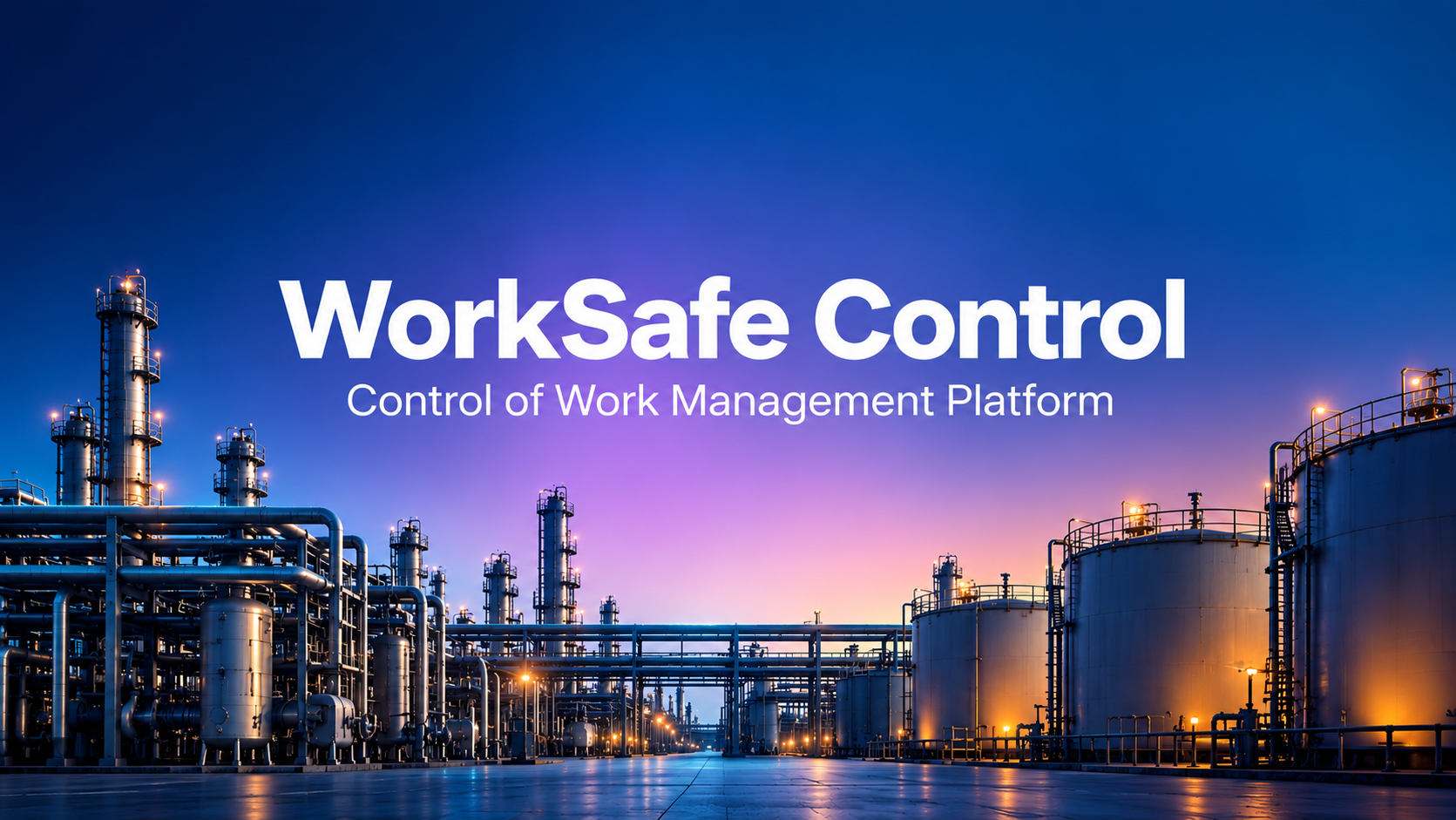
Outcome summary
A concept that turns a permit-centric workflow into a continuous Control of Work journey: Plan → Assess → Authorize → Execute → Monitor → Adapt → Handover → Close. Usability and operational metrics are still to be validated with industrial HSE professionals.
01 — Overview
What this project is
A Control of Work platform concept that helps industrial teams plan, assess, authorize, monitor, hand over and close high-risk work — making missing controls, conflicting activities and changing conditions easier to identify.
- UX Research
- UX Strategy
- Information Architecture
- User Flows
- Wireframes
- UI Design
- Design System
- Prototyping
- Usability Testing (planned)
02 — Context
What was happening before
What was happening before this project started?
Why was this problem important?
Who was affected?
What triggered the need for a solution?
03 — Problem Space
Where this product lives
- Target users
- Industrial supervisors, HSE professionals, operations personnel, maintenance teams, and permit authorities.
- Age / background
- Approx. 25–55 · Experienced professionals in operations, maintenance, engineering, safety or site management
- Environment
- Large oil & gas and petrochemical facilities, including onshore processing plants, refineries, terminals, and offshore-support environments.
- Device
- Primarily desktop or laptop workstations in control rooms, offices, and site administration areas. Company-approved industrial devices may support field activities where permitted.
- Digital comfort
- Medium to high for office-based users; varies across field personnel and contractors
- Market / domain
- B2B enterprise software for oil & gas and other high-risk industrial operations
- Where the problem happens
- Across the whole lifecycle: planning → risk assessment → approval → isolation → execution → monitoring → handover → close-out
04 — Core Mechanism
How the product works
The main journey, the tasks that matter, and the friction that had to be designed out.
01
Work request
Site, area, asset, scope
02
Risk assessment
Hazards for this specific job
03
Permit preparation
Dynamic questions by work type
04
Safety controls
Controls linked to hazards
05
Isolation verification
Energy isolation confirmed
06
Approval
Permit readiness view
07
SIMOPS check
Conflicting nearby activity
08
Execution
Work underway
09
Scope / condition change
Structured reassessment
10
Shift handover
Context carried forward
11
Close-out & handback
Verified, not just clicked
Top user tasks
- 01 — Prepare and authorize high-risk work: A supervisor creates a work request, identifies hazards, adds controls, and sends the permit for approval.
- 02 — Monitor active work: A supervisor or HSE professional checks permit status, isolation status, SIMOPS conflicts, changing conditions, and outstanding actions.
- 03 — Safely close the work: The responsible team verifies completion, checks the work area, confirms personnel and equipment status, and hands the asset back to operations.
Information architecture
- Dashboard: My Tasks · Active Work · Pending Approvals · Permit Status · Alerts
- Control of Work: Work Requests · Permits · Risk Assessments · Safety Controls · Isolation · SIMOPS · Scope Changes · Shift Handover · Close-Out
- Operations: Work Areas · Assets · Contractors · Teams
- Insights: Safety Trends · Permit Performance · SIMOPS Conflicts · Overdue Actions · Historical Work
Friction points
- Information spread across different processes
- Difficulty identifying conflicting simultaneous work
- Static risk assessments that may not reflect changing conditions
- Isolation status not clearly connected to the permit
- Additional work falling outside the original scope
- Loss of context during shift changes
- Unclear responsibility at different stages
- Close-out treated as a simple completion step
- Risk assessment — What hazards actually apply to this specific job?
- SIMOPS — Is another activity creating a conflict with this work?
- Isolation — Has the required energy isolation actually been verified?
- Scope change — Can work continue if the scope has changed?
- Shift handover — Does the incoming supervisor understand the current condition?
What was simplified
- Reduced unnecessary information during permit creation
- Used dynamic questions based on work type
- Connected hazards directly to controls
- Connected permits with isolation information
- Created a visual Permit Readiness view
- Created a SIMOPS conflict view
- Created a structured Scope Change workflow
- Created a dedicated Shift Handover experience
- Converted close-out into a verification workflow rather than a single button
05 — Research Sources
Sources reviewed
- Wolters Kluwer
- Oracle Safety
- TECH EHS
- Pisys
- Heresafe
06 — User Flow
End-to-end user flow
01
Work Request
02
Risk Assessment
03
Permit Preparation
04
Permit Readiness
05
Isolation
06
Isolation Verification
07
SIMOPS Check
08
Authorization
09
Work Execution
10
Scope Change
11
Reassessment
12
Shift Handover
13
Verified Close-Out
14
Handback
07 — Key Insights
How the experience feels
Before
- Uncertainty, information overload, frustration, and pressure to complete approvals
- Concern about missing critical information and lack of visibility into other ongoing work
- Do I have enough information to confidently authorize this work?
- Is the area safe, are all isolations verified, and is another team working nearby?
- Has the work scope changed, what happened during the previous shift, and who owns the next action?
- Trust issue: a green Approved status should not create false confidence when important conditions have changed
- These are research hypotheses, not claimed user-test findings.
After
- Confidence + control + clarity
- Calm, structured, professional, precise, reliable, and safety-focused
- Color used primarily for status and risk communication, not decoration
- Direct copy such as Review Required instead of vague warnings
- Layout prioritizes current status → risk → required action → supporting information
- Critical actions use explicit confirmation, such as Confirm Isolation Verified
08 — User Dynamics
How people actually behave
- 01Check permit information before work
- 02Verify safety controls and isolation
- 03Approve
- 04Monitor and detect change
- 05Reassess risk and controls
- 06Verify, close and hand over
Loop repeats from the last step.
Observed behaviors & workarounds
- Rechecking permit information before work begins
- Confirming safety controls
- Communicating work status during shift changes
- Checking nearby activities
- Updating work information when conditions change
- Following up on incomplete actions
- Potential workarounds: paper documentation, spreadsheets, email, phone or radio, separate isolation records, manual coordination between teams, and verbal shift handovers
- These behaviours and workarounds should be validated with industrial users before being presented as confirmed findings.
- The design aims to move people from getting the permit approved and starting work to continuously verifying that the work remains safe and within approved conditions.
09 — Design Logic
What is measured, and what is not
Documented honestly — targets are stated as targets, not results.
Research sample
5 industry sources analysed for Permit-to-Work and Control of Work challenges.
Usability testing
0 — testing not yet conducted.
Planned usability sample
5–7 participants, ideally including HSE professionals, maintenance supervisors, operations personnel, or permit authorities.
Task completion
Not yet validated. Target: ≥ 90% successful completion of critical prototype tasks without facilitator intervention.
Time saved
Not yet measured. Target: reduce unnecessary steps in permit preparation and approval by approximately 20–30%, subject to usability testing and domain validation.
Errors reduced
Not yet measured. Target: reduce missed or unclear safety-control steps during the prototype workflow.
User confidence
Not yet measured. Target: ≥ 4/5 average confidence when users judge whether they understand the current safety status of the work.
User quote
Not yet available — requires interviews and usability testing. No quote has been invented.
Potential user impact
Better visibility of active work, faster identification of conflicting activities, better understanding of permit readiness, clearer team responsibility, better shift handover, more controlled scope changes, stronger close-out, and improved traceability.
Potential business impact
Reduced administrative effort and coordination delays, better auditability and operational visibility, improved consistency across sites, and better use of historical Control of Work data.
Metrics to be validated
- Permit preparation time
- Approval time
- Number of unnecessary form fields
- Risk-control completion rate
- SIMOPS conflict detection rate
- Isolation verification errors
- Scope-change handling time
- Shift-handover comprehension
- Permit close-out completion
- User confidence
- Task completion rate
- Error rate
This is a conceptual portfolio project. Formal usability testing has not yet been conducted.
10 — Design Engineering
How the work was made
From ideation to prototype, with the artifact produced at each step.
01 — Domain research
Analysis of 5 industry sources on PTW and Control of Work challenges
02 — Problem framing
Problem set: scope changes, SIMOPS, isolation, handover, dynamic risk, close-out
03 — User definition
Primary users and responsibilities across the work lifecycle
04 — Information architecture
Dashboard, Control of Work, Operations and Insights structure
05 — User flows
Permit creation, risk assessment, approval, isolation, SIMOPS, scope change, handover, close-out
06 — Wireframes
Low-fidelity layouts for the end-to-end journey
07 — UI design
High-fidelity enterprise SaaS interfaces with status-led colour use
08 — Design system
Reusable enterprise component and status system
09 — Prototype
Interactive prototype of the Control of Work journey
10 — Testing plan
Usability testing planned around high-risk work scenarios
11 — STAR Story
Situation, Task, Action, Result
Situation
High-risk industrial work involves multiple teams, permits, safety controls, equipment isolations, approvals and simultaneous activities. Information can be distributed across different processes and systems, making it difficult for supervisors and HSE teams to understand the current safety status of a job.
Task
Design a digital Control of Work platform that helps industrial teams plan, assess, authorize, monitor, hand over and close high-risk work, while making missing controls, conflicting activities and changing conditions easier to identify.
Action
Studied existing Permit-to-Work and Control of Work practices, analysed 5 industry sources, and identified key problems around scope changes, SIMOPS, isolation verification, shift handover, dynamic risks and close-out. Defined primary users and responsibilities, created the information architecture, designed the end-to-end journey and user flows, produced low-fidelity wireframes and high-fidelity SaaS interfaces, built a reusable enterprise design system and interactive prototype, and planned usability testing around high-risk work scenarios.
Result
The concept transformed a permit-centric workflow into a continuous Control of Work journey — Plan → Assess → Authorize → Execute → Monitor → Adapt → Handover → Close. The primary design outcome was improved visibility of the relationship between work, people, risks, controls, equipment and other ongoing activities. Usability and operational metrics are still to be validated with industrial HSE professionals.
12 — Before / After
What changed
Before
- Permit-centric, approve-once workflow
- Isolation, SIMOPS and risk information held separately
- Verbal, unstructured shift handovers
- Close-out as a completion step
After
- Continuous Control of Work journey
- Permit readiness, isolation and SIMOPS connected in one view
- Structured handover carrying current condition and open actions
- Close-out as a verification workflow
13 — Final Screens
Screens and decisions
Each visual is captioned with the design decision behind it.
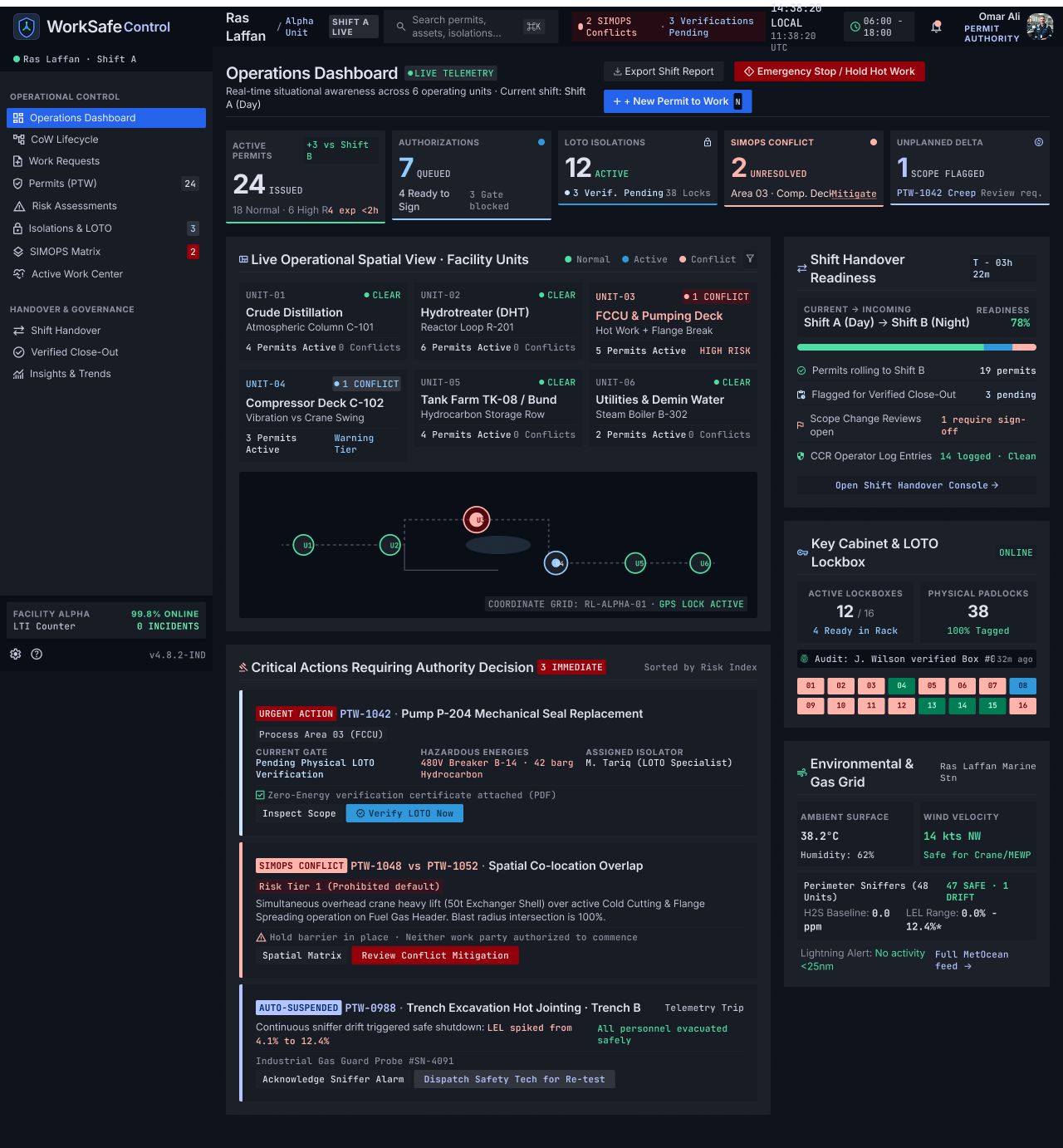
Operations Dashboard
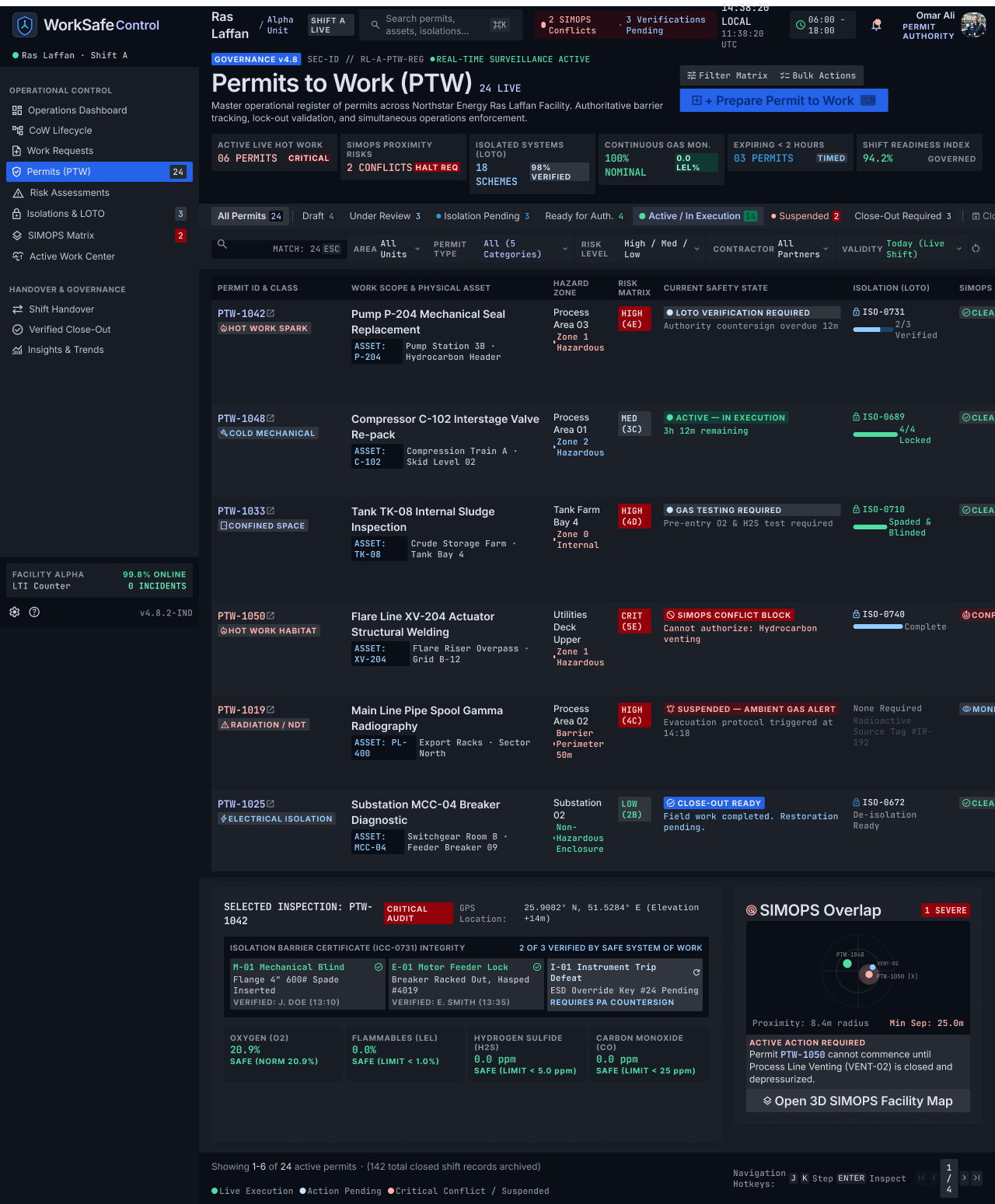
Permits to Work (PTW)
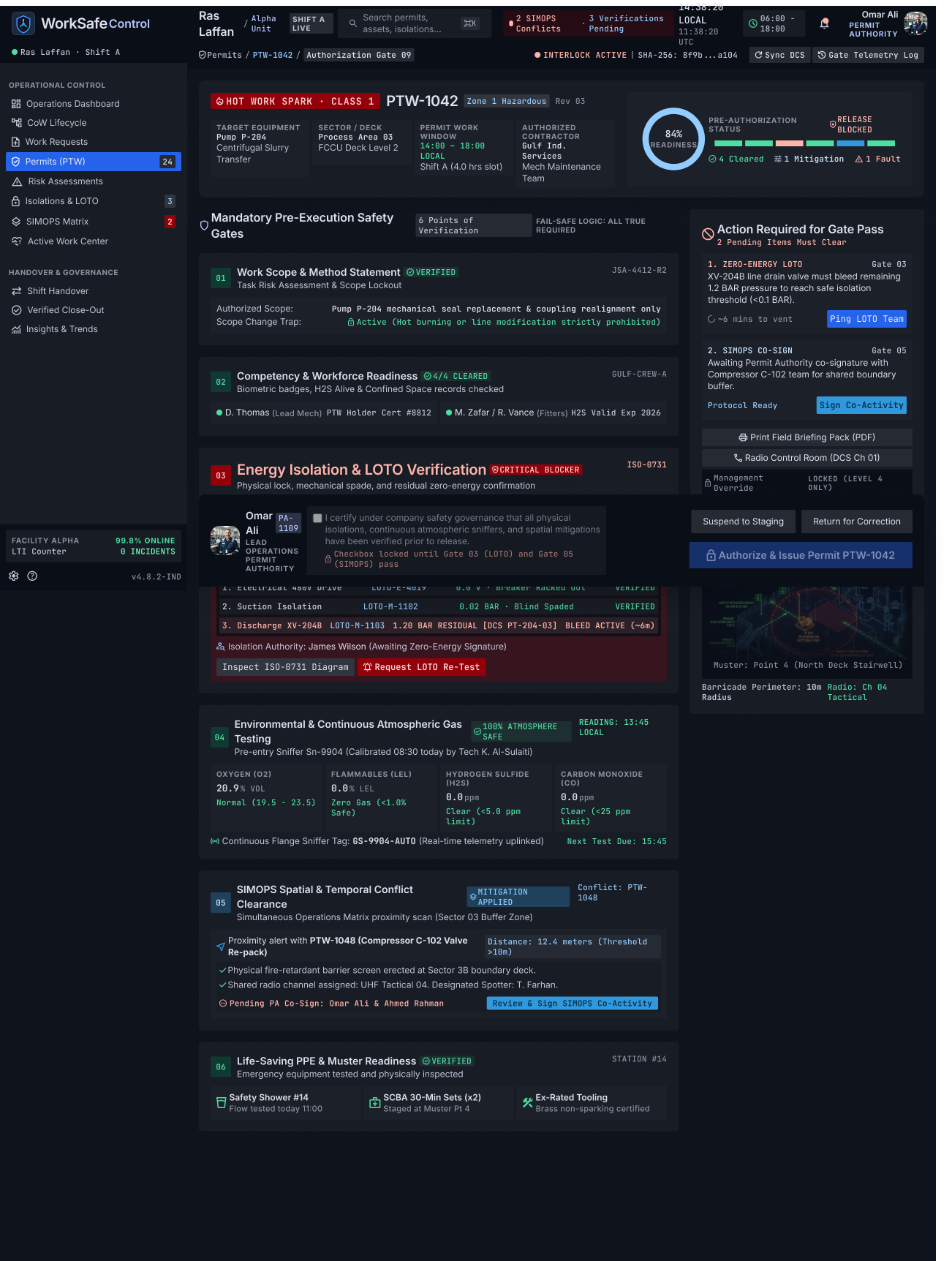
Permit Readiness & Authorization Gate
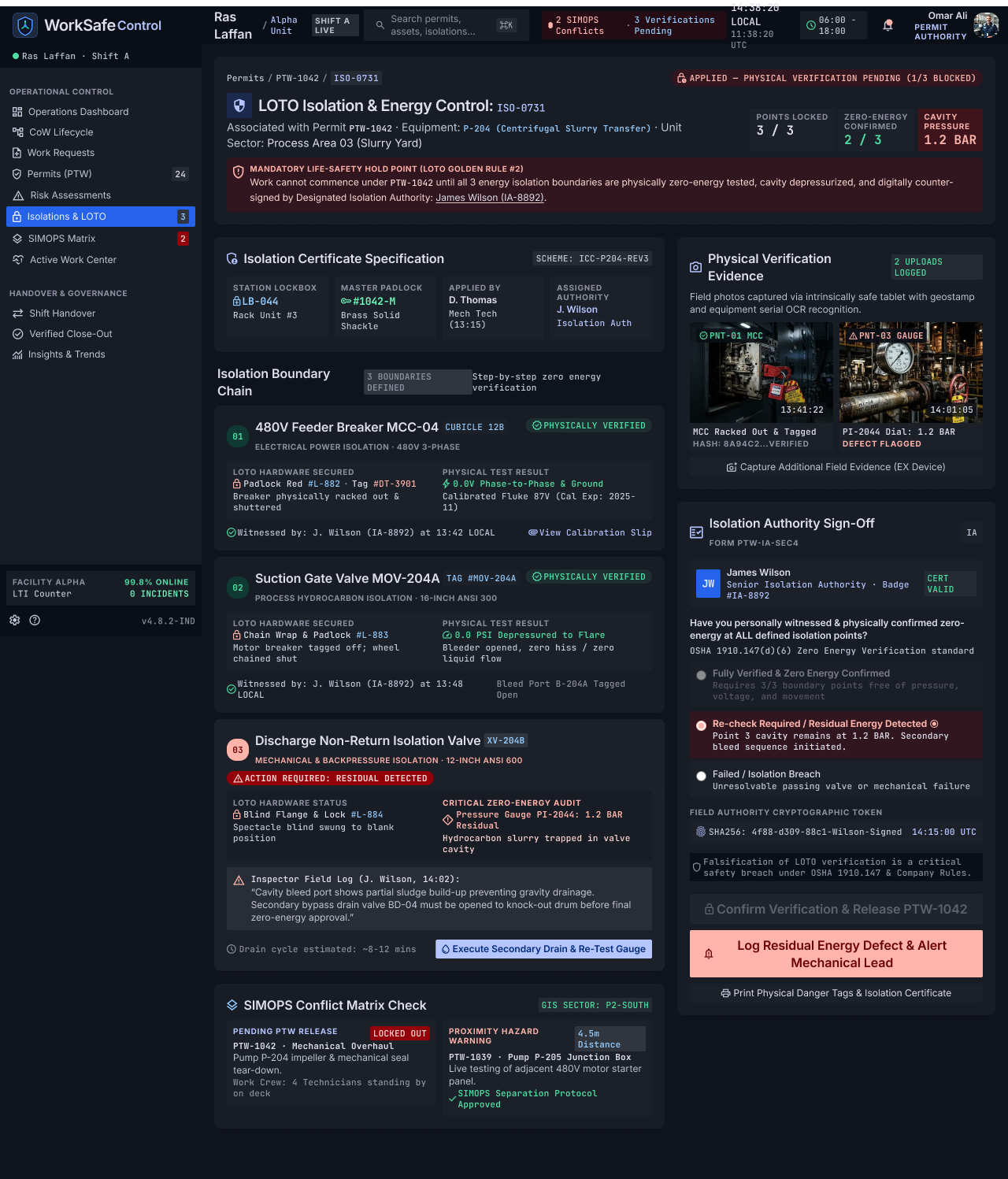
LOTO Isolation & Energy Control Verification
14 — Feedback Loops
Conceptual loops in the system
Change response loop
- 01Change detected
- 02Affected permit highlighted
- 03Responsible person alerted
- 04Change reviewed
- 05Risk / control updated
- 06Re-approval if required
- 07Work continues
Continuous control loop
- 01Observe
- 02Assess
- 03Act
- 04Verify
Conceptual loops — not measured behavioural results.
15 — Key Features
What the concept includes
Permit Readiness
One view of whether a permit is genuinely ready.
Concept feature
Isolation Verification
Isolation status connected to the permit itself.
Concept feature
SIMOPS Conflict Detection
Surfaces conflicting simultaneous activity.
Concept feature
Dynamic Scope Change
Structured reassessment when the work changes.
Concept feature
Shift Handover
Carries current condition and open actions forward.
Concept feature
Verified Close-Out
Area, personnel and equipment verified before handback.
Concept feature
All six are concept features from a research-and-prototype stage project; none are launched.
16 — Learnings
What I take forward
01
Structure before polish — safety-critical products need clear role-based architecture before visual refinement.
02
Status must stay honest — a green approval that no longer reflects reality is worse than no status at all.
03
Colour and copy carry safety meaning; both should be reserved for status, risk and required action.
04
Define measurable success criteria alongside the design so a concept can be validated, not just presented.
17 — Key Takeaway
What this project proves
Safety-critical software is an information architecture problem before it is an interface problem. Treating the work — not the permit — as the object being managed is what makes changing conditions visible.
18 — Next Project